Various boat projects and ideas related to boating in general. Feel free to contribute your project. We are looking for the unusual; the new or different technique; or boat improvement project or product that others may find useful. Please email us at solaceadventures at gmail dot com to tell us about something you might have, to put on our blog site. Please, limit your comments to the subject or item(s) discussed. Businesses posting, that don't adhere to this, will be deleted.
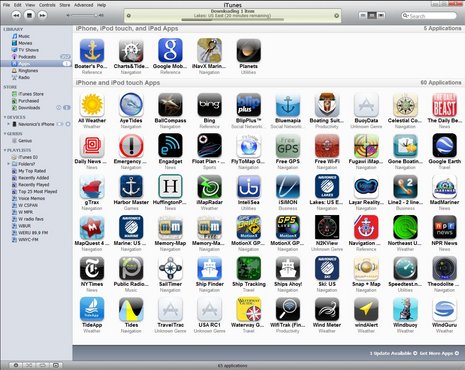
Here is an app I recently downloaded to my iPod touch. In traveling around the world, I wanted a tide app that is easy to use and work with iNavX in the iPad. Ayetides XL does that, and I'm using it's little brother, Ayetides, available for the iPhone and iPod Touch for $9.99.
Here is a standard tide table screen from AyeTides, one of the best standalone tide apps for sailors traveling around the world. In addition to high and low tides, it shows sun and moon rise and setting times. Near the top you see the water height at the present moment and the arrow indicating a falling tide. Scroll sideways to move days forward or backward.
Most important for choosing a tide app is its specificity for your area. This app is purported to have over 9,900 tide stations in it's list, however, you may do better for your local area by purchasing an app specific for your area.
Importantly, AyeTides stores all data on your device - you don’t need connectivity on the boat to have all tide areas at your fingertips.
Here is AyeTides’ graph of today’s tides, the clear circle at the top showing the present moment. You can tap or drag the circle around to see the water level at different times.
The app has been designed for ease and speed of use. To toggle between the standard table and the graph shown here, just rotate your iPhone or iPod Touch and the accelerometer makes the change for you.
Touching the little "i" located in the top right of my first picture, flips the page and shows the tide station location with a lat and long.
In the finding a station window, you can find by, Alphabet, Geographic, Nearest Station, and Recently Opened. You can also save a tide station as a favorite and that has it's own list window. There are some preferences to change to your liking.
There are two types of stations in AyeTides, currents (tidal streams) and tides. You don't see the depth at a current station and you don't see the current at a tide station. To see the nearest current station, tap on the info button (the 'i'), select "Find Nearby Stations" and look for the first station that's in bold. Alternatively, go to the main view's Find a Station menu and in the Alphabetical list, tap the search button and enter the word "Current". This will show you all the current stations in AyeTides.
A significant benefit of the current data is that boaters can easily and immediately correct the common erroneous assumption that the ebb current begins at high tide and the flood current at low tide. In reality, there is a time lag before the current reverses and starts up again that depending on local factors can be longer than an hour. If you’re guessing about tidal current changes based on high and low tide times, you can be surprised and perhaps caught unaware.
Accuracy? Pretty close!! I checked it against two different tide charts available off the internet for Gladstone, Australia. The Ayetides showed a High Tide at 11.48am at 3.74 Meters.
The other tide tables from the internet, showed 11.54@3.8M and 11.44@3.77M . I could be happy with that. I'd give it 8.5 out of 10
In traveling around the world, most sailors think of the weather a lot when making passage. There are various methods to obtain that weather and I'm presenting here Weather 4D.
Whats so interesting for me is that it is another iApp which works on the iPad and is integrated with one of my favourite navigation software iNavX. Not only that, the details of that weather can be obtained by email.
Without further ado, i_Marine apps has a review which can be found here. I've started his review for you with the most pertinent details, but do go over to i_Marine apps to read his full review.
If you spend anytime on the water you become very aware of the weather. I am always looking for tools to help me keep safe while on the water. Weather4D Pro will help even the novice become a professional weatherman. This app brings all the weather you will ever want into one app and allows you to display and analyze weather patterns and systems all over the world. The app's intuitive interface will make it easy to get the latest weather for your area and see predictions up to 8 days out.
Olivier Bouyssou is the mastermind and developer of the Weather4D PRO app. He has recently updated it to a Pro model. Version 1.1.1 just came out February 5th and is jam packed with tons of new features and upgrades your going to love.
I previously reviewed the Weather4D app last April and have used it some over the summer. This version seems to be more targeted towards the nautical user who wants to do weather routing on longer passages across the worlds oceans. The integration and importing of GPS routes into the display allows this. If you don't need these routing features purchase Weather4D. Additional GRIB file options of importing, copying, saving and opening in other programs gives you more flexibility to use the weather files. You can also retrieve GRIB files via the Iridium AxcessPoint app with a satellite phone (and other email methods).
Weather Data Features:
Cloud cover
CAPE (Convective Available Potential Energy)
Snow, Rain
Pressure
Wind direction and speed (10 meters above ground)
Temperature (2 meters above ground)
Waves, height, direction and period
Forecast Models Features:
Up to 8 day forecast
Data intervals 3, 12, 24hr
Global Coverage
Resolution .5, 1 and 2 degrees
Data updated every 6 hours
Display Features:
GRIB file import in .rgb,grb.gz, Grb.bz2
Share GRIB files through the Open In" feature
Worldwide weather
Zonal setup
Temperature color transparency overlays
Isobar transparency overlays
Wind color and transparency overlays
Precipitation amount overlay
Adjustable cloud cover transparency
Wave transparency overlays
Download GRIB files through Iridium phones
Prediction passage of Iridium satellites
Request GRIB files with SailDocs by mail
Import of KML route files from iNavX for display on the forecasts
I ran the app on my iPad and I have to say the bigger screen makes it easier to see all the great features. The main displays is rich is color and detail and it provides the user a wealth of information.
Continued on i_Marine apps ...........
There is a multitude of sites through Google search which give excellent reviews and information about iNavX. Search and see for yourselves; but I'll place a few here; and there are links in the following information.
Try iNavX Review which has some great video tutorials.
Take a look at i-Marine Apps for their "Getting Started with iNavX.
And then take a look at the iPad holders from Zacor. And this waterproof casing here.
Finally link it all together with your electronics with an iMux as alluded to in a former blog or have it as a stand alone product with its own GPS from Badelf.
Here is a snopsis from iNavX themselves.......
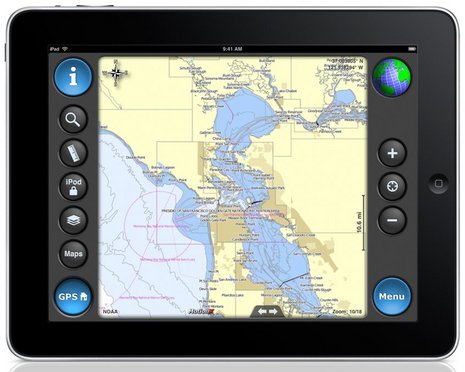
iNavX™ brings the freely available, official and up to date NOAA RNC raster United States waters marine charts to your iPhone, iPod touch and iPad. Included detailed chart coverage: West Coast, Gulf Coast, East Coast, Great Lakes, Alaska, Hawaii, and US Virgin Islands. One app for all your devices with access to thousands of charts and maps: official CHS Canada charts, Navionics Gold charts, Fish'N'Chip charts, HotMaps, NV. Verlag charts, Hilton's Fishing charts, TRAK Canada lakes fishing maps and Solteknik European waters charts may be purchased separately from X-Traverse.
With iNavX™ you can use the built in location services (i.e. GPS, cell tower, WiFi) to plot your position in real-time on the multi-touch scrolling and zooming and rotating (including course up) marine chart.
Using the iPhone's, iPod touch's and iPad's WiFi connection, iNavX™ can act as a repeater for popular marine navigation software that supports NMEA data over TCP/IP such as MacENC and Coastal Explorer. This includes GPS, AIS receivers & transponders, and Instruments (Depth, Speed, Wind, etc.)
In addition to real-time chart plotting and printing, iNavX™ supports waypoints & routes including KML (Google Earth) and GPX import/export, track log, measuring bearing/distance, GRIB weather forecast, tides/currents, anchor alarm, graphic instrumentation display and port/navaid search.
The power of a color chartplotter for a fraction of the cost. And Boaters.Com has this to say.....
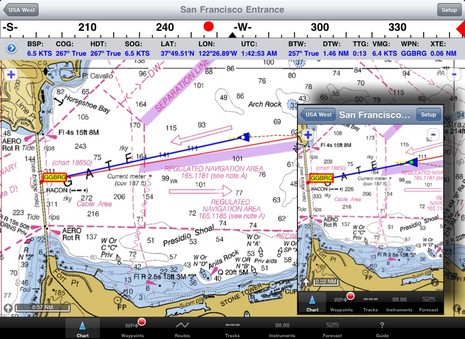
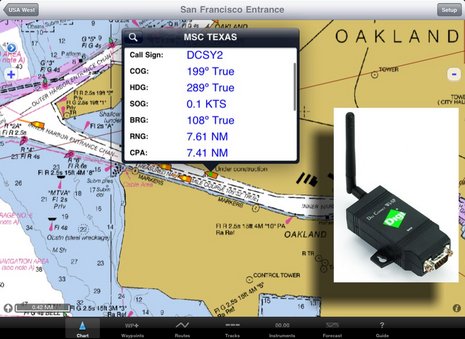
In fact, the iNavX web site now boasts "The power of a color chartplotter for a fraction of the cost" and, while I'll stay out of that argument for the time being, developer Rich Ray does make a good case for how far he's taken the software, and how able it looks on the bigger iPad. Note, for instance, the series of screen shots comparing iNavX iPhone and iPad versions. Ray has also gotten his program to play nicely with a Digi Connect WI-SP WiFi serial server, which means you can get AIS and other NMEA 0183 data flowing to your iThing without any other computer involved (and he even added a Digi Connect guide to his extensive help files).
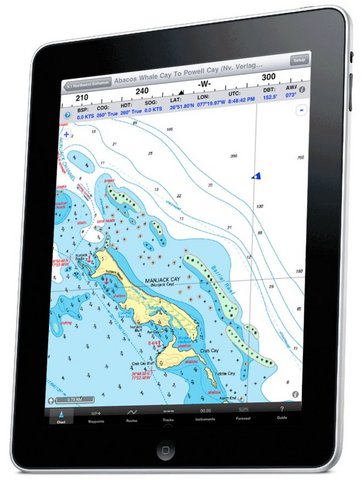
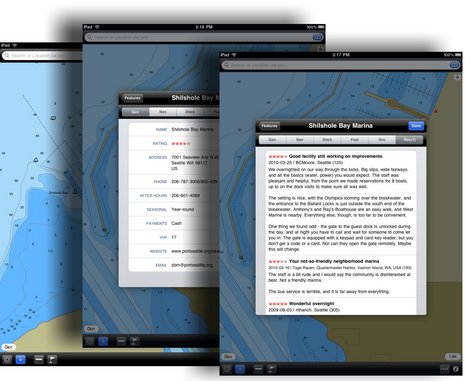
And if you want to use your spiffy iNavX/iPad combo with anything but free NOAA raster charts, you'll be pleased to know that X-Traverse keeps growing its already giant cartography portfolio, and adding to what the service can do (new Facebook integration, for instance, plus integration with Navionics NavPlanner 2). When you purchase charts via X-Traverse you get two activations, so if you're already using them on, say, an iPhone but haven't activated them with a PC or Mac, you're probably good to go if you get an iPad. The exception: Navionics is pricing its iPad charts differently -- understandable, I think, given how inexpensive their iPhone charts are, and their many partnerships with companies that manufacture those old time chartplotter things -- though $50 for the new U.S. super regionis not bad. That region includes the Northern Bahamas, by the way, but below is a sample of alternate NV charts of the same area, also offered by X-Traverse. Choices are good. And I'm not done... Navimatics has not only adapted its Charts & Tides program for the iPad, but expanded the included regions of NOAA ENC charts, lowered the price, and is just about to add support for ActiveCaptain! The implementation looks good on an iPad, too, as you can see below. As with MaxSea TimeZero 1.9 (just about to release!) and the Coastal Explorer 2010 beta, the ActiveCaptain data is cached so you still have it when not connected to the Internet. And we know Active Captain itself is also working on an iPad app. Damn.
i-Marine Apps tells us how to get additional charts through X-Traverse
If you want additional charts other than the free NOAA charts you can purchase these through X-Traverse. This process is complicated, so follow below.
You will need an X-Traverse account to purchase and access your charts. This account will cost you $10.00 per year and allows you access to your charts through the iNavX app. Access to Grib weather files and transfer of waypoints and tracks can also be done through your account.
Once you have your X-Traverse account you can then purchase additional charts. Make sure you purchase the iPad charts for download. They offer a wide range of Navionics, CHS Canadian Charts, Fish"N"Chips, HotMaps, NV Verlag and Hilton fishing charts.
To access and download your purchased charts in your iNavX app you need to add your X-Traverse account information to the app. Go to "Preferences" and select "X-Traverse Account". This is where you will add your email and password for your account.
Next select "Show Account Information" this will retrieve your account info showing you what products you have activated for use by the iNavX app.
You will next need to go back to the Charts list and select "Add More Charts to Menu". The next menu should show you the list of charts. The charts you purchased should show up as bolded. I purchased Navionics Gold Marine Charts 2011. Select this and another display will show the charts in that package. Turn "ON" the charts you purchased.
Go back to the iNavX menu and select the chart you turned on to view you charts. Select your chart title and download you your iPad.


 Here is AyeTides’ graph of today’s tides, the clear circle at the top showing the present moment. You can tap or drag the circle around to see the water level at different times.